 Scrooms Wiki
How to catch Scrooms: timing, tuning and catch control
Learn how to catch Scrooms through the timing, tuning and tracking stages. This guide combines the official catching rules with published PC and touch instructions, then shows how to check a failed attempt.
Page updated:
How to catch Scrooms: the sequence at a glance
Equip a catching instrument, start an encounter, complete tuning, then keep the Scroom inside the catch zone until the progress bar fills. The official SCROOMS description confirms that leaving the zone drains progress and that higher Tune Speed makes tuning quicker.
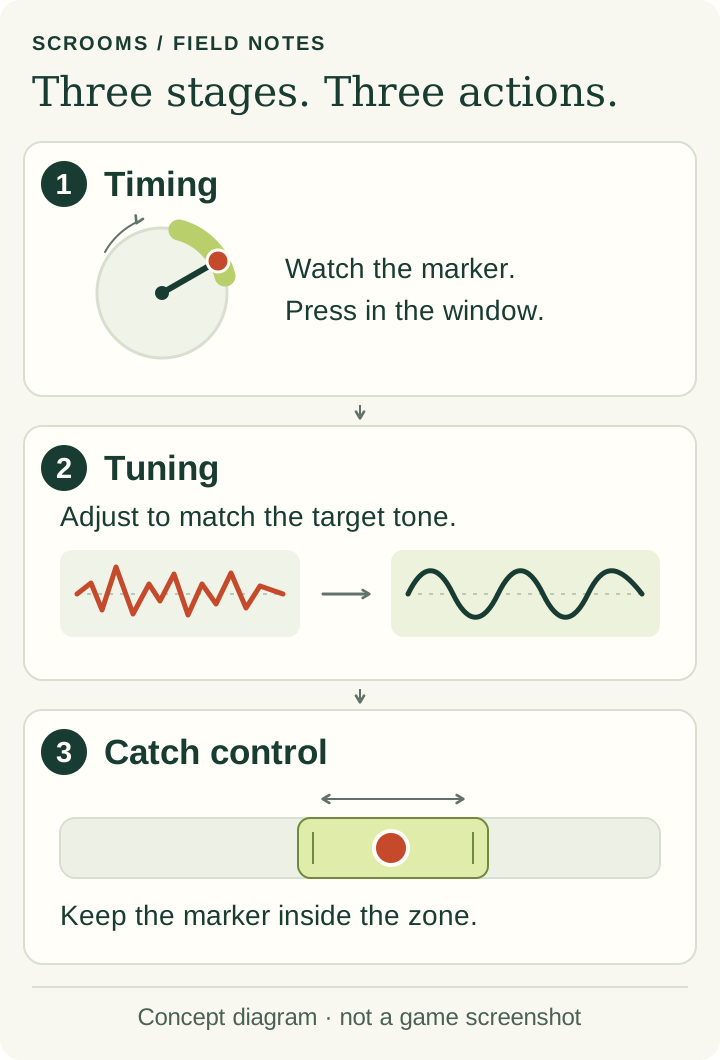
The detailed walkthroughs reviewed here show three control screens in this order: circular timing gauge → frequency slider → horizontal catch zone. The circle is the opening timing check in those reports, not a guaranteed extra step after catching. These are source-reviewed instructions; we have not tested the current game on a phone or PC.
Before starting: check the selected item
New players receive the Wooden Lute through Leo’s opening tutorial, according to the published beginner walkthrough. If you still need that introduction, follow the first-session steps.
Check the active instrument before attempting another catch. Having an item in your bag and selecting it for use are different things. Our equipment instructions explain the reported bag workflow. Keep the current tutorial prompt visible so you can distinguish an equip objective from a catching objective.
With the instrument equipped, play near a Scroom to draw it in. The controls walkthrough then describes a start-tuning prompt: click it on PC or tap it on mobile to open the timing gauge. Opening that gauge and hitting its moving marker are separate inputs.
1. Time the input on the circular gauge
The Wooden Lute walkthrough describes a moving marker and a colored wedge. Click on PC or tap on a touchscreen when the marker reaches that wedge. The resulting timing feedback is separate from catching the Scroom.
Use this screen’s moving marker as your cue. A favorable timing result is a reason to continue watching for the next instruction, not a reason to stop interacting. If the interface changes to a waveform, move on to the frequency control below.
2. Hold and adjust the frequency slider
The PC and mobile controls report describes holding and moving the tuning marker until the irregular waveform becomes smooth. This is a sustained adjustment rather than another single timing tap.
Watch the waveform on your current attempt. A frequency printed in the Scrooms catalogue is reference information; this guide does not establish a number-entry shortcut or a way to force a particular Scroom to appear.
3. Keep the Scroom inside the catch zone
When the horizontal catch interface appears, switch attention from the waveform to the Scroom marker. The controls report describes holding and dragging that marker to follow the highlighted zone. The official rule is simple: progress grows inside the zone and drains outside it.
Check whether the meter is increasing while you make a correction. That gives you feedback about this stage; a good opening timing input does not by itself complete the catch. Continue until the game shows the result.
Catching Scrooms on PC and mobile
| Action | PC | Touchscreen |
|---|---|---|
| Timing input | Mouse click | Tap |
| Adjust frequency | Hold and move the mouse | Hold and move a finger |
| Track the catch zone | Hold and drag the Scroom marker | Hold and drag the Scroom marker |
We have not measured a success-rate advantage for either device. Button positions, controller mappings and accessibility settings are outside this source review. Use the action named by the current interface if its layout differs.
Find the stage of a failed Scroom catch
These checks help describe a failed attempt; they are not confirmed fixes for a game bug.
| What you see | What to check next |
|---|---|
| No catching interface | Check the selected item and the active tutorial or interaction prompt before comparing instrument stats. |
| You miss the circular marker | Watch the marked timing window. Do not start dragging as though the frequency screen were already open. |
| The waveform does not settle | Check that you are holding the frequency control rather than repeatedly tapping it. |
| The catch meter rises, then falls | Watch the Scroom marker’s position relative to the moving zone. The earlier waveform is no longer the relevant indicator. |
| Your screen has different controls | Read its current prompt. Note your device, stage and visible message before reporting a discrepancy. |
For a useful comparison, change one thing at a time. Record the stage reached and the result, rather than labeling every unsuccessful attempt a tuning problem. That observation can guide your next practice attempt without inventing a success percentage.
Confirm the catch, then choose your next task
The Wooden Lute report shows a result screen with the Scroom’s name and measured frequency after a successful catch. Read that result before identifying the Scroom or recording it in your own notes. A timing rating alone is not the final result.
If the game reports that the Scroom escaped, identify the failed stage and try the corresponding check above. If this was your first tutorial catch, follow the active objective back to Leo. For later attempts, the Scrooms list helps with identification and the instrument comparison separates reported attributes from unmeasured catch rates.
Higher Tune Speed has an official explanation: quicker tuning. It is not evidence of a guaranteed catch, a specific rare-Scroom probability or a fixed Chimes-per-hour rate.
What this guide has checked
Sources were read on October 28, 2026. The official listing supplies the core rule; the control details come from the linked October 11 walkthroughs. Rereading those articles does not establish that every control is unchanged in today’s build.
We did not record gameplay, copy publisher screenshots or measure device performance. An older October 9 pre-release mechanics article uses broader rhythm terminology and mentions a possible circular variation. That does not support promising a mandatory final-circle stage for every encounter. See our editorial policy for how reported and directly verified information are distinguished.
Sources and review dates
- SCROOMS on Roblox — official catching descriptionSource reviewed:
- AllThingsHow — beginner walkthrough (updated October 11, 2026)Source reviewed:
- AllThingsHow — Wooden Lute catch sequence (updated October 11, 2026)Source reviewed:
- AllThingsHow — PC and mobile controls (updated October 11, 2026)Source reviewed:
- AllThingsHow — older mechanics report (updated October 9, 2026)Source reviewed:
An independent guide to SCROOMS on Roblox. Public-source research is not an in-game playtest.